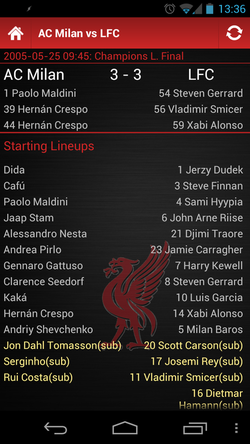
 A new version of the lfc history app has been released which adds more detailed results for every game and opponent player profiles.
Download link - Google Play
0 Comments
 Application Features
Official LFChistory.net app, Liverpool’s unrivalled prestigious history in the palm of your hand. * * * * * The complete LFC history! The best app for the best history in football!! Contains the stats and history for all Liverpool FC players and managers that have ever called Anfield their home. Updates automatically after every game. CURRENT FEATURES: * Every single player Profile * Every single manager profile * Complete Season Archive (Every league, game and goal since the club was founded in 1892) * Honours/Trophy Cabinet *new* * Today in history * LFChistory.net articles * Twitter Profiles (LFC Connect like feature) * Easily share any profile or article to friends using Twitter, Facebook etc Your having a debate in the pub with your mates and you need the answer quickly. Get the answer in seconds: * How much did Suarez cost? * How many goals has Fowler scored? * Shankly’s first game in charge? * How many games has Steven Gerrard played? The list is endless. The new ‘today in history’ feature enables you to see player birthdays and debuts made on the current day!! If a player or manager has a twitter account, their tweets will be displayed on their profile page. If we have missed anyone out please let us know. If John W Henry is reading this description, this also refers to the best history in Soccer!!! For more information click here Recent new features Manager and player profiles now contain their twitter feeds. Liverpool’s honours are now fully displayed for every competition. FEEDBACK You can follow updates on the application on twitter, facebook and Google plus to recieve and leave feedback.Facebook Google Plus lfchistory@danwms.co.uk If you have any suggestions for new features I would be very keen to hear them. 
LFCHistory for Android Version 1.1.4 now available in the android market, download for free now.
Application Features LFChistory.net App for all Liverpool fans.Contains the stats and history for all Liverpool players andmanagers past and present. The information is updated every day so your facts will never be out of date.Want to know much Suarez cost?Want to know how many goals Fowler scored?This has all the info you need right at your fingertips.
Updates 1.1.4
When working on my own app I had a lot of trouble trying to find a complete working solution on how to change the highlight colour which is used when a list view item is selected or pressed. There are lots of examples online but I struggled to find one that demonstrated the complete solution. I have managed to get this working with the following. To begin with I have created my own theme which extends the default android one. The benefit of doing this is that I can make changes in one place and they will affect the entire application. Anything that I do not change in the theme will simply fall back to using the default settings. Create the theme in styles.xml - /res/values/styles.xml: <?xml version="1.0" encoding="utf-8"?> <resources> <style name="MyTheme" parent="android:Theme"> <item name="android:listViewStyle">@style/MyListView</item> </style> <style name="MyListView"> <item name="android:layout_width">fill_parent</item> <item name="android:layout_height">fill_parent</item> <item name="android:background">@android:color/transparent</item> <item name="android:cacheColorHint">@android:color/transparent</item> <item name="android:listSelector">@drawable/selector</item> </style> <color name="red">#ff0000</color> </resources> The only change which is made to the default theme is the list view style which is defined in the same xml file along with the colour red. The lisView style references a @drawable/selector. This must also be defined in its own xml file. /res/drawable/selector.xml: <?xml version="1.0" encoding="utf-8"?> <selector xmlns:android="http://schemas.android.com/apk/res/android"> <!-- When Pressed --> <item android:drawable="@drawable/selector_pressed" android:state_pressed="true"/> <!-- When Selected --> <item android:drawable="@drawable/selector_selected" android:state_selected="true" android:state_focused="false" android:state_pressed="false"/> </selector> The selector specifies two items which are used to determine what is displayed when the listView item is selected and pressed. These must also be set up in their own xml files. /res/drawable/selector_pressed.xml: <?xml version="1.0" encoding="utf-8"?> <layer-list xmlns:android="http://schemas.android.com/apk/res/android"> <item> <shape android:shape="rectangle"> <solid android:color="@color/red"/> <size android:width="1dip"/> <size android:height="1dip"/> </shape> </item> </layer-list> <?xml version="1.0" encoding="utf-8"?> <layer-list xmlns:android="http://schemas.android.com/apk/res/android"> <item> <shape android:shape="rectangle"> <solid android:color="@color/red"/> <size android:width="1dip"/> <size android:height="1dip"/> </shape> </item> </layer-list> /res/drawable/selector_pressed.xml: <?xml version="1.0" encoding="utf-8"?> <layer-list xmlns:android="http://schemas.android.com/apk/res/android"> <item> <shape android:shape="rectangle"> <solid android:color="@color/red"/> <size android:width="1dip"/> <size android:height="1dip"/> </shape> </item> </layer-list> They define a rectangle which is used to highlight the selected/pressed row. The colour is set to red which was also defined in the styles.xml. The content of the two files are exactly the same which means that when selected or when pressed the item will be highlighted in red. The selector could just reference the same file for the different states but by having them in separate files it allows more control and demonstrates how it would be possible to set different colours when the item is pressed or selected. The final thing to do is update the manifest file to use the custom theme. This can be done on individual activities or on the whole application. e.g. <application android:icon="@drawable/icon" android:label="@string/app_name" android:theme="@style/MyTheme"> Hopefully if you are trying to do the same thing as me you will find this helpful. |
MeI am a Liverpool supporting software developer originally from North Wales, now living and working in Manchester. Archives
May 2019
Categories
All

|
 RSS Feed
